<?xml version="1.0" encoding="utf-8"?><feed xmlns="http://www.w3.org/2005/Atom" ><generator uri="https://jekyllrb.com/" version="4.3.4">Jekyll</generator><link href="https://tomjnapier.co.uk/feed.xml" rel="self" type="application/atom+xml" /><link href="https://tomjnapier.co.uk/" rel="alternate" type="text/html" /><updated>2026-04-12T11:53:52+00:00</updated><id>https://tomjnapier.co.uk/feed.xml</id><title type="html">Tom J Napier</title><subtitle>Hi there, I’m Tom. I’m a web developer and accessibilty specialist. I’m currently working for the civil service in the UK.</subtitle><author><name>Tom J Napier</name><email>hi@tomjnapier.co.uk</email></author><entry><title type="html">6 considerations for Accessible chatbots</title><link href="https://tomjnapier.co.uk/accessibility/2026/03/26/accessible-chatbots" rel="alternate" type="text/html" title="6 considerations for Accessible chatbots" /><published>2026-03-26T08:00:00+00:00</published><updated>2026-03-26T08:00:00+00:00</updated><id>https://tomjnapier.co.uk/accessibility/2026/03/26/accessible-chatbots</id><content type="html" xml:base="https://tomjnapier.co.uk/accessibility/2026/03/26/accessible-chatbots"><![CDATA[<p>I’m seeing more public sector product teams starting to build AI chatbots into their services. For many of them, this kind of interface is still uncharted territory. Some less than ideal practices from the big AI firms are being used for design references - and they’re not always accessible.</p>

<p>So perhaps it’s a good time to talk about a few areas to focus on when trying to make an AI chatbot accessible.</p>

<h2 id="ai-chatbot-interfaces">AI chatbot interfaces</h2>

<p>In this post, I’m talking about web interfaces, where you can type a <em>prompt</em> (an instruction to the AI) and you get a response back. I’m sure lots of people are familiar with AI chatbots by now (it’s hard to do a Google search in 2026 without ending up interacting with Google’s AI mode). But it’s good to be clear about what I mean when I’m talking about AI chatbots here.</p>

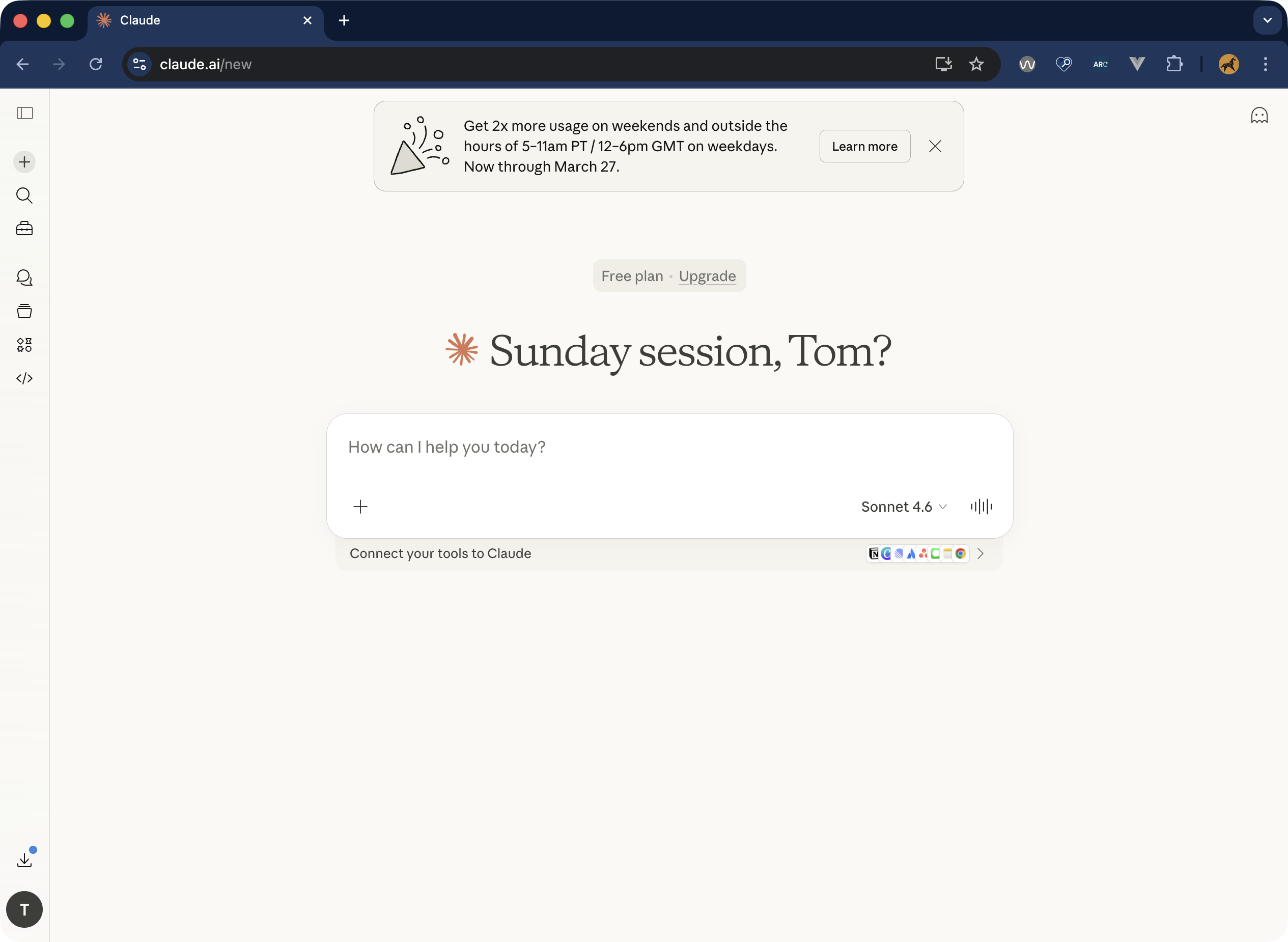
<p>The prompt is usually text, but it could include images, or videos too. The response is typically a mix of text, media, and suggested follow up questions. Here’s an example from Anthropic’s Claude interface:</p>
<figure>
    <div class="post__image-wrapper">
        <img src="/assets/images//2026-03-26-accessible-chatbots/Claude-screenshot.png" alt="Screenshot of the Claude chatbot interface. There's a big input space in the middle of the screen to write a prompt, with text above that reads 'Sunday Session, Tom?'" />
    </div>
    <figcaption>Despite complex underlying technology, most chatbot interfaces are quite simple</figcaption>
 </figure>

<p>In many ways, it’s a simple interface, and the accessibility considerations aren’t that complex. So what do we need to think about?</p>

<ol>
  <li><a href="#1-responses-need-to-be-announced-by-screen-readers">Responses need to be announced by screen readers</a></li>
  <li><a href="#2-inputs-need-to-be-labelled">Inputs need to be labelled</a></li>
  <li><a href="#3-scrollable-areas-need-to-be-keyboard-accessible">Scrollable areas need to be keyboard accessible</a></li>
  <li><a href="#4-empty-states-and-whitespace-dont-harm-navigation">Empty states and whitespace don’t harm navigation</a></li>
  <li><a href="#5-feedback-mechanisms-are-clear">Feedback mechanisms are clear</a></li>
  <li><a href="#6-animations-are-respectful">Animations are respectful</a></li>
</ol>

<h2 id="1-responses-need-to-be-announced-by-screen-readers">1. Responses need to be announced by screen readers</h2>

<p>Let’s start with announcements. Most of the teams I’ve worked with understand that dynamic content changes need to be announced by screen reader software.</p>

<p>But there are a few possible approaches to AI responses that you could take here. Which way you get the responses to be announced in part depends on the response.</p>

<h3 id="read-the-whole-message">Read the whole message</h3>

<p>One approach might be to have screen readers announce the whole body of the response when it has loaded. This could be OK when the chatbot responses are very short and just text. To get content to be automatically announced by screen readers, we could use <code class="language-plaintext highlighter-rouge">live</code> regions, with ARIA. This will mean the user doesn’t have to move keyboard focus, or the screen reader cursor to that bit of content.</p>

<p>The live region announcement won’t include any semantic information. So if there’s buttons, headings, links in the changed content, the fact that they’re buttons, headings or links won’t be conveyed by screen readers. It’ll be a bit like the contents were plain text. The semantic information will be there for screen reader users if they go to the response and read it, but it won’t be part of automatic announcement.</p>

<p>Here, we could add in each of the attributes we need to get screen readers to announce the new content. So, adding <code class="language-plaintext highlighter-rouge">aria-live="polite"</code> to have screen readers announce the new content when there’s a suitable gap. And <code class="language-plaintext highlighter-rouge">aria-atomic="false"</code> to make sure the screen reader only reads the content that has changed.</p>

<p>The <code class="language-plaintext highlighter-rouge">log</code> role is another option for this. The log role implicitly uses <code class="language-plaintext highlighter-rouge">aria-live="polite"</code> and <code class="language-plaintext highlighter-rouge">aria-atomic="false"</code>. Semantically, it should be just what we need.</p>

<p>What’s the log role? According to <a href="https://www.w3.org/TR/wai-aria-1.2/#log">the WAI-ARIA 1.2 spec</a>, it’s “A type of live region where new information is added in meaningful order and old information may disappear […] Examples include chat logs.” In our chat interface, we’re adding new information in a meaningful order (prompt, then response, then follow up prompt, et cetera.)</p>

<p>Here’s how that would be implemented in code:</p>

<figure tabindex="0" role="region" aria-label="ARIA Log role code example" class="highlight"><pre><code class="language-html" data-lang="html"><span class="nt">&lt;div</span> <span class="na">role=</span><span class="s">"log"</span> <span class="na">aria-labelledby=</span><span class="s">"chat-heading"</span><span class="nt">&gt;</span>
    <span class="nt">&lt;h2</span> <span class="na">id=</span><span class="s">"chat-heading"</span><span class="nt">&gt;</span>AI chat history<span class="nt">&lt;/h2&gt;</span>
    <span class="nt">&lt;ul&gt;</span>
        <span class="nt">&lt;li&gt;</span>In a sentence, what easy recipes use basil as an ingredient?<span class="nt">&lt;/li&gt;</span>
        <span class="nt">&lt;li&gt;</span>Easy basil-based recipes include fresh Caprese salad with sliced 
        tomatoes and mozzarella, homemade basil pesto blended with pine nuts 
        and parmesan, and simple tomato basil soup<span class="nt">&lt;/li&gt;</span>
    <span class="nt">&lt;/ul&gt;</span>
<span class="nt">&lt;/div&gt;</span></code></pre></figure>

<p>If you look through the WCAG docs, you can also find <a href="https://www.w3.org/WAI/WCAG21/working-examples/aria-role-log/chatlog.html">a working example of the log role</a>, using a chat interaction to demonstrate, no less.</p>

<p>It sounds like it fits the bill, but you need to test this. Support for the <code class="language-plaintext highlighter-rouge">log</code> role (and other live region roles) across screen readers has been historically mixed. I tested with JAWS and macOS VoiceOver and it behaved as expected. However, iOS VoiceOver didn’t always announce new content correctly.</p>

<p>Speaking to other accessibility specialists, there’s a theme around screen readers on touch devices not supporting the log role well. Check out <a href="https://a11ysupport.io/tech/aria/log_role">A11y Support</a>, <a href="https://dequeuniversity.com/library/aria/liveregion-playground">Deque’s Live Region Playground</a>, and <a href="https://www.sarasoueidan.com/blog/accessible-notifications-with-aria-live-regions-part-1/">Sara Soueidan’s in-depth two-part article on live regions</a> if you want to dive into more detail here.</p>

<p>So, perhaps a different approach…</p>

<h3 id="announce-that-there-is-a-new-message-but-dont-announce-the-message">Announce that there is a new message, but don’t announce the message</h3>

<p>Not announcing the actual message content might not seem very helpful on the face of it. However, this might be a better approach for an AI chatbot responses. See, some chatbots don’t output a response in a one-shot. They output a line of text at a time (or part of an image). Starting to announce the whole response content when the response isn’t complete yet might not be a good experience.</p>

<p>Further, responses might be very long, multi-part, or have different kinds of content. That means it might be a bit overbearing to announce the entirety of the response, and some of the content might not be as clear without the semantic context.</p>

<p>So it might be better for the screen reader to announce the status of response generation - for example <code class="language-plaintext highlighter-rouge">"response generating"</code>, or  <code class="language-plaintext highlighter-rouge">"response ready"</code> - rather than the response itself. That would help us out when our responses are incomplete, long or multi-part. You can also provide mechanisms for users to jump straight to that response too, so that they can go and read it for themselves (Deque’s Axe Assistant work like this, with a button to “Go to recent response”).</p>

<p>Implementing this can be achieved by having a container with a role of “status”, whose content gets added, updated or replaced. The container should be present when the page loads - you need to add the content to the container when you want a status message to be announced.</p>

<figure tabindex="0" role="region" aria-label="ARIA Status role code example" class="highlight"><pre><code class="language-html" data-lang="html"><span class="nt">&lt;div</span> <span class="na">role=</span><span class="s">"status"</span> <span class="na">aria-atomic=</span><span class="s">"true"</span><span class="nt">&gt;</span>Response generating<span class="nt">&lt;/div&gt;</span></code></pre></figure>

<p>You need to give careful consideration to what response statuses you want to convey. It also might help non-screen reader users to see these statuses as well, so you might not want to hide this content.</p>

<h3 id="wcag-success-criteria-to-pay-attention-to">WCAG Success Criteria to pay attention to</h3>
<ul>
  <li><a href="https://www.w3.org/WAI/WCAG22/Understanding/info-and-relationships.html">1.3.1 Info and Relationships</a></li>
  <li><a href="https://www.w3.org/WAI/WCAG22/Understanding/status-messages.html">4.1.3 Status Messages</a></li>
</ul>

<h2 id="2-inputs-need-to-be-labelled">2. Inputs need to be labelled</h2>

<p>We know that form inputs need to be labelled so that users know what to do. There should be a visible label, and an accessible name (usually just the same as the label). Sighted users can rely on the visible label to know what to input, and screen reader users will hear the accessible name of the input.</p>

<p>Voice recognition software users work with a combination of the two. Most voice recognition users will speak commands based on what they see on screen. Then the software interacts programmatically with the accessible name. So, I can see an input labelled “First Name”, I say “click First Name”, and as long as the accessible name matches, my command should work.</p>

<p>This is fairly basic need, and one that most teams understand the importance of. When it comes to chatbots, an unfortunate trend has taken hold. There’s some design convergence around not visibly labelling the prompt input field. Some chatbots use placeholder text, but that’s not really much better. Chat-GPT, Copilot, Google AI mode and Claude all use placeholders to label the prompt input. They also each have curious ways of providing accessible names.</p>

<p>This might be the convention, but that doesn’t mean it’s good. Voice recognition users are going to have a harder time selecting the input, because one or more of the following is true:</p>
<ul>
  <li>there’s no visible label</li>
  <li>the label is a placeholder, so as soon as you start entering in text, the label disappears</li>
  <li>there is placeholder text, but that’s completely different to the accessible name</li>
</ul>

<p>So, don’t be like the others - add <strong>a persistent, visible label</strong>, and make that the <strong>accessible name for the prompt input</strong>.</p>

<h3 id="wcag-success-criteria-to-pay-attention-to-1">WCAG Success Criteria to pay attention to</h3>
<ul>
  <li><a href="https://www.w3.org/WAI/WCAG22/Understanding/label-in-name.html">2.5.3 Label in Name</a></li>
  <li><a href="https://www.w3.org/WAI/WCAG22/Understanding/labels-or-instructions.html">3.3.2 Labels or Instructions</a></li>
</ul>

<h2 id="3-scrollable-areas-need-to-be-keyboard-accessible">3. Scrollable areas need to be keyboard accessible</h2>

<p>Chats can get long! So that means we’re going to have to scroll up and down to read back through the chat. Most of the time, this is no problem - you just scroll the page. There are a couple of things to flag here though.</p>

<p>First, you’ll probably have your prompt input area stuck to bottom of the viewport. That’s fine, but bear in mind any sticky content (using <code class="language-plaintext highlighter-rouge">position: fixed</code> or <code class="language-plaintext highlighter-rouge">position: sticky</code> in CSS) will obscure content beneath it. You’ll need to ensure that you don’t completely obscure focusable elements in the chat with your sticky input.</p>

<p>Check out <a href="https://www.w3.org/WAI/WCAG22/Understanding/focus-not-obscured-minimum.html">2.4.11 Focus Not Obscured</a> in WCAG for more detail here. A good way to test this is to <code class="language-plaintext highlighter-rouge">Tab</code> forward through interactive elements and check if your sticky content hides anything. And then, crucially, pressing <code class="language-plaintext highlighter-rouge">Shift + Tab</code> to go back through elements checking the same thing. Navigating with a keyboard is more difficult when keyboard focus is not visible, or obscured. So we need to implement sticky content carefully.</p>

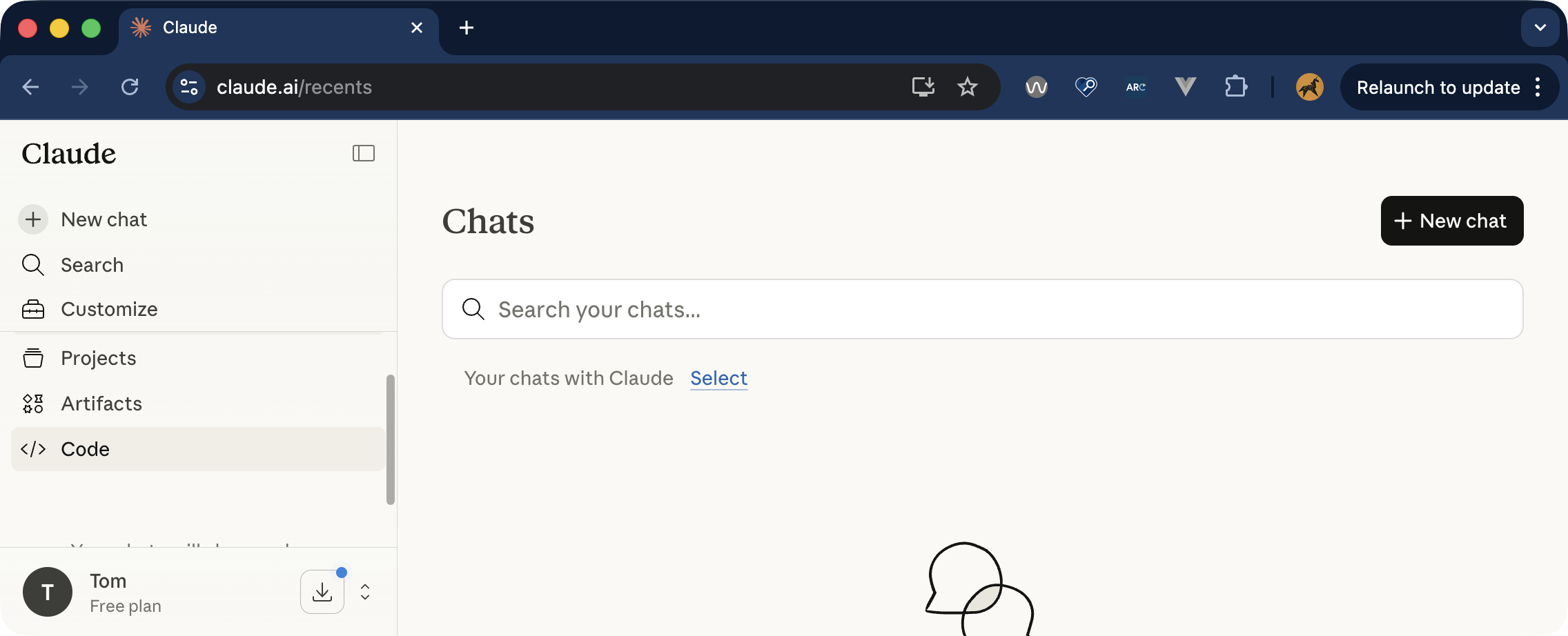
<p>Second, you might want more than one scrollable area in your chatbot interface. If you have a sidebar or panel next to the main chat interface, you might not want to scroll the whole page to get to that sidebar content. You can put the sidebar content in a scrollable container. That container needs to be scrollable with a keyboard (using arrow keys), as well as a mouse.</p>

<figure>
    <div class="post__image-wrapper">
        <img src="/assets/images//2026-03-26-accessible-chatbots/claude-sidebar.png" alt="Screenshot of the Claude chatbot interface in a small window. Controls in a sidebar don't fit in the window, so the sidebar has scroll bars to access all the controls." />
    </div>
    <figcaption>If you have different scrollable areas in the interface, you need to make sure you can scroll all of them with a keyboard.</figcaption>
 </figure>

<h3 id="wcag-success-criteria-to-pay-attention-to-2">WCAG Success Criteria to pay attention to</h3>
<ul>
  <li><a href="https://www.w3.org/WAI/WCAG22/Understanding/keyboard.html">2.1.1 Keyboard</a></li>
  <li><a href="https://www.w3.org/WAI/WCAG22/Understanding/focus-not-obscured-minimum.html">2.4.11 Focus Not Obscured (Minimum)</a></li>
</ul>

<h2 id="4-empty-states-and-whitespace-dont-harm-navigation">4. Empty states and whitespace don’t harm navigation</h2>

<p>Let’s think back to the first screenshot in this post, of the Claude interface. One of the notable things about that screen is that it is remarkably empty. Before interacting with a chatbot, there’s not really much going on in the interface. Just a big input box to write your first prompt, usually floating in a sea of empty space around it. Great, minimal design, but possibly not ideal for people who use screen magnifiers.</p>

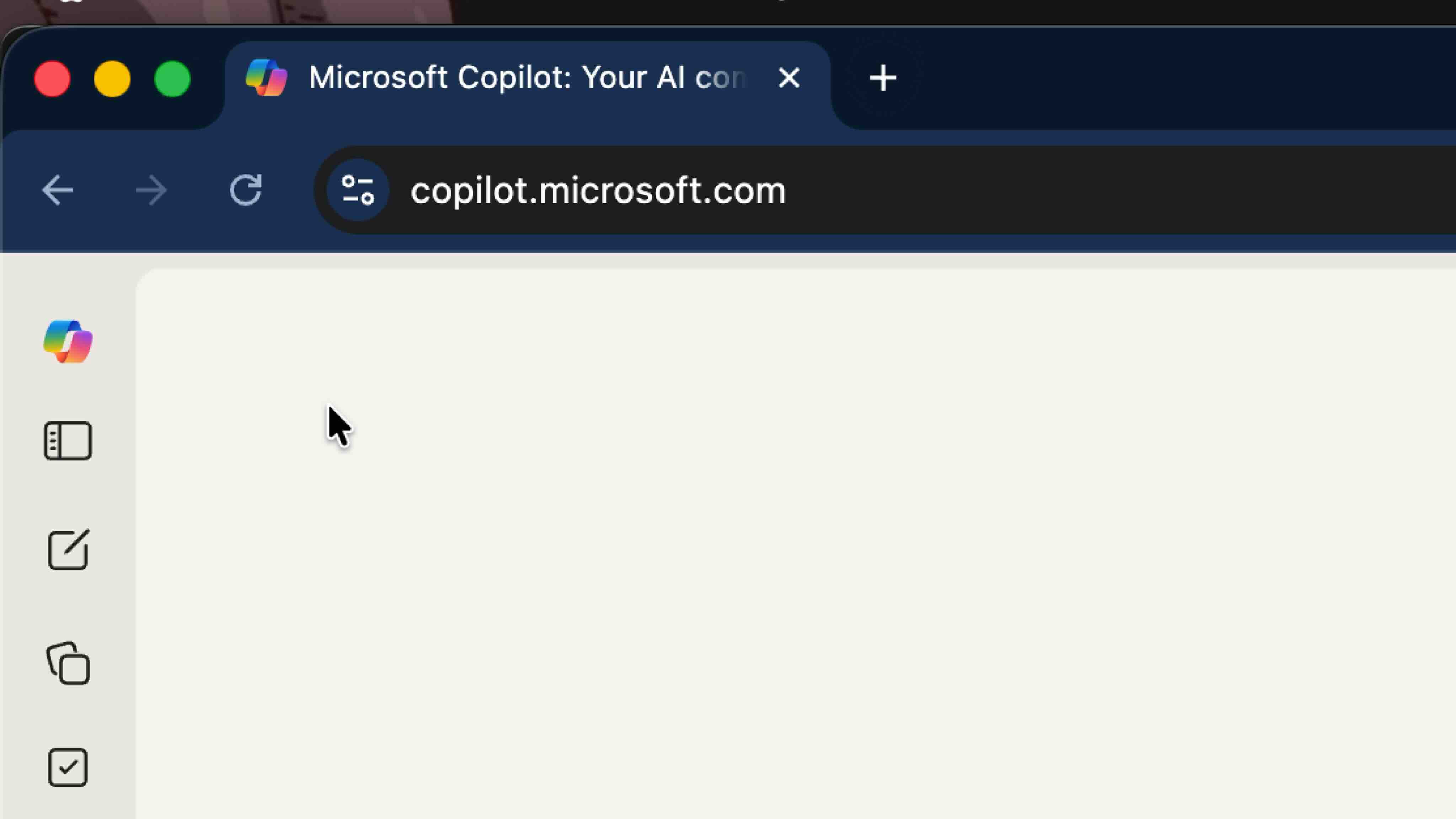
<p>When zoomed into the screen with 8 or 10 times magnification, finding that prompt input is going to be difficult for some users.</p>

<figure>
    <div class="post__image-wrapper">
        <img src="/assets/images//2026-03-26-accessible-chatbots/copilot-magnified.jpg" alt="Screenshot of the Copilot chatbot interface, magnified using a screen magnifier. There are controls in a sidebar, but the prompt input is somewhere off screen." />
    </div>
    <figcaption>Even with moderate zoom, there's no sign of the prompt input here - we have to go hunting for it.</figcaption>
 </figure>

<p>There might be several ways to address this. Adding in controls to skip to the prompt input could be an option. Aligning the prompt input closer to the top left of the viewport could be another.</p>

<p>First though, I’d recommend doing some research with screen magnifier users. As chatbots become more and more common, it might be that users have developed adaptive strategies for navigating them.</p>

<h2 id="5-feedback-mechanisms-are-clear">5. Feedback mechanisms are clear</h2>

<p>Chatbots produce responses based on models. This should come as no surprise, but, they’re not perfect. (a quick <a href="https://www.google.com/search?q=chatbot+hallucination&amp;sca_esv=b67966820d436860&amp;biw=1470&amp;bih=835&amp;tbm=nws&amp;sxsrf=ANbL-n4zYoafOQoaaAvXo8q7raGrfWnrBw%3A1774183387640&amp;ei=2-O_aabjJq2uhbIP34-ByQs&amp;ved=0ahUKEwjmvNiUxLOTAxUtV0EAHd9HILkQ4dUDCA4&amp;uact=5&amp;oq=chatbot+hallucination&amp;gs_lp=Egxnd3Mtd2l6LW5ld3MiFWNoYXRib3QgaGFsbHVjaW5hdGlvbjILEAAYgAQYkQIYigUyBRAAGIAEMgUQABiABDIGEAAYFhgeMgYQABgWGB4yBhAAGBYYHjIGEAAYFhgeMgYQABgWGB4yBhAAGBYYHjIGEAAYFhgeSOwFUNsCWK8EcAB4AJABAJgBXaAB4gGqAQEzuAEDyAEA-AEBmAIDoALvAcICCxAAGIAEGIYDGIoFwgIIEAAYgAQYogSYAwCIBgGSBwEzoAfuEbIHATO4B-8BwgcFMC4xLjLIBwqACAA&amp;sclient=gws-wiz-news">Google search for AI hallucinations</a>, and you’ll see what I mean).</p>

<p>Most AI chatbots show some acknowledgement of their fallibility. This is why they have things like thumbs up/thumbs down buttons under responses for you to provide feedback. In a public sector context, transparency and accuracy are critical. You may already be thinking about designing in feedback and reporting mechanisms for responses.</p>

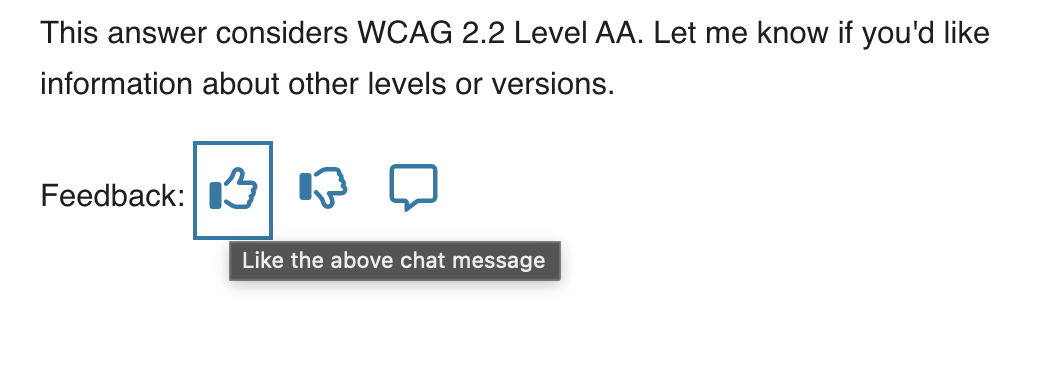
<p>Where you have several chat responses on a page, you’ll also likely have several feedback buttons. You will need some unique names for each of these buttons, so that it’s clear which button is for which chat response.</p>

<p>If you’re just using icons, without visible labels, then it is essential you have an accessible name for each button. A common approach is to use an <code class="language-plaintext highlighter-rouge">aria-label</code>. But what do you call each button, so that it clearly relates to a particular response?</p>

<p>You could use the timestamp of the response (so, “like the response sent at 13:02”). That perhaps just creates another overhead for the user though. Now they have to figure out what response was sent at which time.</p>

<p>A far simpler naming method is to refer to the “above” or “previous” response. For example, “like the above response” or “dislike the above response”. It’s generally acceptable to use “above” and “below” to mean “before” and “after”.</p>

<p>(There’s a specific note about this in the WCAG understanding docs, under <a href="https://www.w3.org/WAI/WCAG22/Understanding/sensory-characteristics.html">1.3.3 Sensory Characteristics</a>).</p>

<p>I have to admit, I spend so much time in the mindset that elements need to be linked programmatically. Sometimes I forget about this more straightforward approach.</p>

<figure>
    <div class="post__image-wrapper">
        <img src="/assets/images//2026-03-26-accessible-chatbots/axe-assistant-feedback.png" alt="screenshot of a response from Deque's Axe Assistant. There are three feedback controls represented by a thumb up, thumb down and a message. The title of the thumb up control is showing. it says 'Like the above chat message'." />
    </div>
    <figcaption>Deque's Axe Assistant has an "aria-label" and a "title" that provide a name for feedback buttons. It's clear which button is for which response.</figcaption>
 </figure>

<h2 id="6-animations-are-respectful">6. Animations are respectful</h2>

<p>Dynamic content - the stuff that gets injected into the page, without a page reload - is pretty much a necessity with AI chatbots. More often than not, that dynamic content is animated as it loads in. I’m sure this is a smoke and mirrors conceit, rather than a technological constraint…</p>

<p>You might also want to use animations to indicate a “loading” or “response generating” status. If we’re animating stuff on the page, that can be engaging for some people, but actively harmful for others. That does not mean we cannot ever use animations. We need to be careful when we do use them though, and we need to respect the preferences of users who don’t want to see these animations at all.</p>

<p>Check out this post from Adobe’s Stefan Chitu: <a href="https://adobe.design/stories/leading-design/animation-that-fails-safely-defensive-design-for-motion-sensitive-users">Animation that fails safely: Defensive design for motion-sensitive users</a>. Stefan gave a great talk at this year’s <a href="https://www.deque.com/axe-con/">Axe-Con</a>, based on that post, that has lots of useful tips on designing accessible animations.</p>

<h3 id="wcag-success-criteria-to-pay-attention-to-3">WCAG Success Criteria to pay attention to</h3>
<p><a href="https://www.w3.org/WAI/WCAG22/Understanding/animation-from-interactions.html">2.3.3 Animation from Interactions (Level AAA)</a></p>

<h2 id="conclusion">Conclusion</h2>

<p>So there are my thoughts - I’ll come back and update this post as I learn more about how chatbots are used in a public sector context and get more practical examples. In the meantime, let’s make sure we go back to first principles when designing interfaces, even if the technology is treading into new territory.</p>

<p><strong>Updated 31/03/26</strong> - I updated the section around the <code class="language-plaintext highlighter-rouge">log</code> role to add some additional warnings about its use (and to more clearly steer towards the “Announce that there is a new message, but don’t announce the message” route). Thanks to Adam for the excellent background knowledge on the log role here.</p>]]></content><author><name>Tom J Napier</name><email>hi@tomjnapier.co.uk</email></author><category term="accessibility" /><summary type="html"><![CDATA[I’m seeing more public sector product teams starting to build AI chatbots into their services. For many of them, this kind of interface is still uncharted territory. Some less than ideal practices from the big AI firms are being used for design references - and they’re not always accessible.]]></summary><media:thumbnail xmlns:media="http://search.yahoo.com/mrss/" url="https://tomjnapier.co.uk/assets/images/2026-03-26-accessible-chatbots/post-share.png" /><media:content medium="image" url="https://tomjnapier.co.uk/assets/images/2026-03-26-accessible-chatbots/post-share.png" xmlns:media="http://search.yahoo.com/mrss/" /></entry><entry><title type="html">2024: The best things I’ve watched</title><link href="https://tomjnapier.co.uk/reviews/2024/12/12/2024-watch-list" rel="alternate" type="text/html" title="2024: The best things I’ve watched" /><published>2024-12-12T08:00:00+00:00</published><updated>2024-12-12T08:00:00+00:00</updated><id>https://tomjnapier.co.uk/reviews/2024/12/12/2024-watch-list</id><content type="html" xml:base="https://tomjnapier.co.uk/reviews/2024/12/12/2024-watch-list"><![CDATA[<p>I got a cinema membership this year, and between that and the various streaming subscriptions I’ve not yet cancelled, I’ve watched a bunch of movies and some interesting TV. Here are my top, no, scratch that, memorable picks:</p>

<ul>
  <li><a href="#civil-war">Civil War</a></li>
  <li><a href="#love-lies-bleeding">Love Lies Bleeding</a></li>
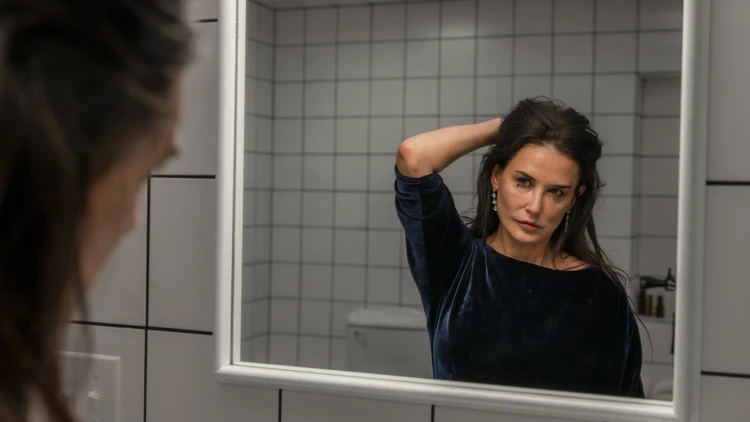
  <li><a href="#the-substance">The Substance</a></li>
  <li><a href="#conclave">Conclave</a></li>
  <li><a href="#heretic">Heretic</a></li>
  <li><a href="#alien-romulus">Alien: Romulus</a></li>
  <li><a href="#scavengers-reign">Scavenger’s Reign</a></li>
  <li><a href="#the-bear">The Bear</a></li>
  <li><a href="#x-men-97">X-Men ‘97</a></li>
</ul>

<h2 id="civil-war">Civil War</h2>

<p>I feel like <em>Civil War</em> had a mixed reception on release. Some criticised the film’s <a href="https://www.independent.co.uk/arts-entertainment/films/reviews/civil-war-review-kirsten-dunst-b2526238.html">reluctance to directly address the politics of division</a>. I think that’s maybe a little harsh. For me, <em>Civil War</em> captured the ludicrous or irrational nature of such conflicts; a sense of “we can’t remember why we’re fighting anymore, but they’re shooting at us, so we’re shooting back” runs right through each of the interactions in the film.</p>

<figure>
    <div class="post__image-wrapper">
        <img src="/assets/images/civil_war.webp" alt="Jesse Plemons, in Civil War" />
    </div>
    <figcaption>"What kind of American are you?"</figcaption>
 </figure>

<p>The cinematography and set pieces that director Alex Garland puts together seem elevated from previous works. Jesse Plemons’ scene, teased in trailers at the time, where has asks, but “what kind of American are you?” is a tense, gripping high point. The slightly contrived destiny of Kirsten Dunst’s Lee in a penultimate scene was less believable.</p>

<h2 id="love-lies-bleeding">Love Lies Bleeding</h2>

<figure>
    <div class="post__image-wrapper">
        <img src="/assets/images/love_lies_bleeding.webp" alt="Ed Harris, in Love Lies Bleeding" />
    </div>
    <figcaption>The grossly terrifying Lou Sr.</figcaption>
 </figure>

<p>Sweaty, neon, mullets, eighties. There’s an aesthetic to <em>Love Lies Bleeding</em> that may have the feel of some sweltering summer night, but the style never seems to get in the way of this engaging, romantic-crime-drama-thriller-neo-noir. It’s about a body-builder, Jackie, (Katy O’Brian) who becomes entangled, romantically and perilously, with the manager, Lou, (Kristen Stewart) of south-western US gym.</p>

<p>Steroid fuelled, rage induced violent action ensues. There’s more body horror on show (not quite to <em>The Substance</em> levels) and a truly wild ending that stomps head-first into the surreal.</p>

<p>Lou and Jackie’s passionate, co-dependant relationship make the engaging focal point of the story, but the hair-do Lou Sr. (Ed Harris) also wows. Another excellent friday night viewing.</p>

<h2 id="the-substance">The Substance</h2>

<p>I’m not massively into body horror, and I’m still a little disturbed from my uninitiated viewing of <em>Midsommar</em> a few years back. At least this time a had a little warning about <em>The Substance</em>’s more graphic elements.</p>

<figure>
    <div class="post__image-wrapper">
        <img src="/assets/images/the-substance.webp" alt="Still from The Substance. Demi Moore's character is staring into a mirror, tearfully trying to change her hair" />
    </div>
    <figcaption>Demi Moore, as Elisabeth Sparkle, facing reality in The Substance</figcaption>
 </figure>

<p>It’s a story about beauty and age, and societies’ sickness of disavowing anyone with not enough of the former and too much of the latter.</p>

<p>Demi Moore gives a full on performance and the movie doesn’t seem to pull a single punch. It’s as engaging as it is gross.</p>

<h2 id="conclave">Conclave</h2>

<p>From the trailers I’d assumed this was going to be a fairly run of the mill costume drama fare. I’m glad I was wrong. <em>Conclave</em> has an unexpected depth, cinematic beauty and a provocative denouement that made this a standout for me in 2024.</p>

<p>I hadn’t read Robert Harris’ novel, so went into the theatre cold for <em>Conclave</em>. Ralph Fiennes lends his typical subtletly to scenes with an excellent supporting cast (who doesn’t love John Lithgow and Stanley Tucci?).</p>

<h2 id="heretic">Heretic</h2>

<p>Friday night popcorn light horror - and that’s not meant to sound derogatory. It feels like films such as <em>Heretic</em> are few and far between these days. A simple premise delivers tension almost immediately - two mormon missionaries visit the home of Hugh Grant’s Mr. Reed, and they don’t leave.</p>

<p>The dialog, particularly in later scenes, gets a little trite, but <em>Heretic</em> is never boring. I left the screening satisfied, not wanting any more, and again, that’s a compliment.</p>

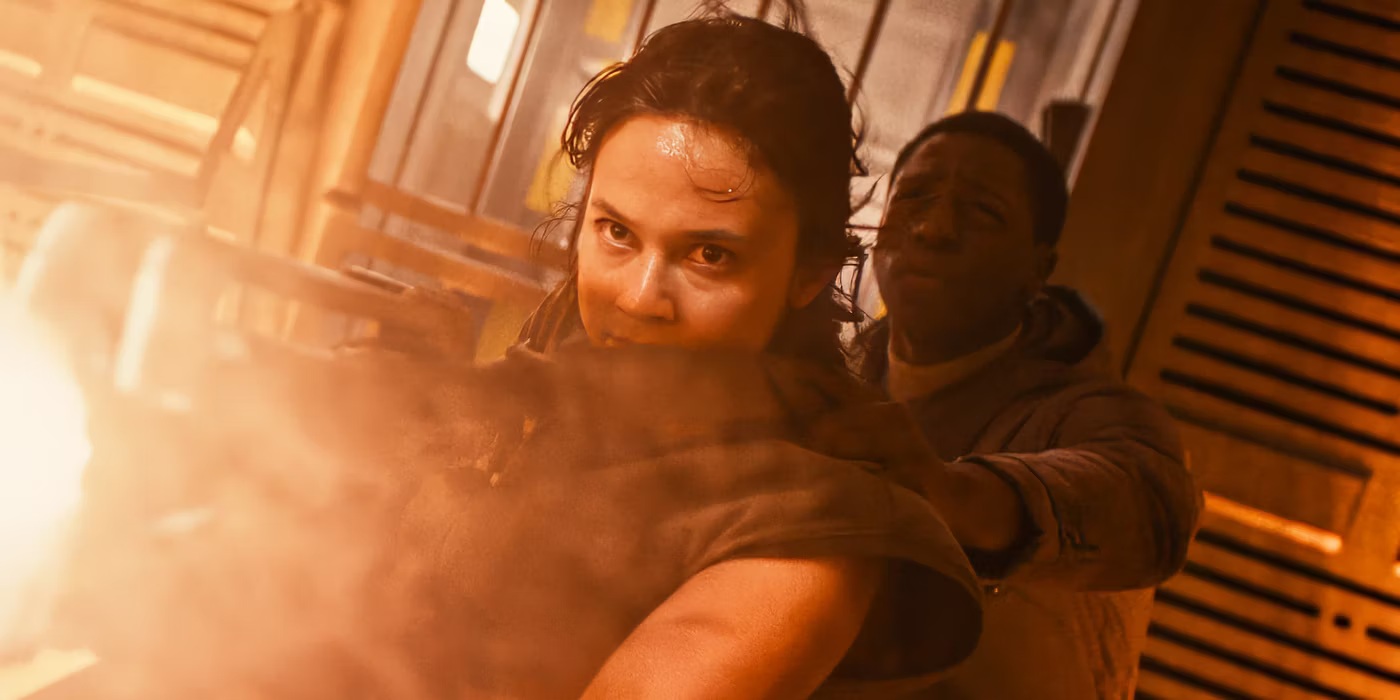
<h2 id="alien-romulus">Alien: Romulus</h2>

<p>Hmmm. Credit where it’s due, <em>Alien: Romulus</em> doesn’t repeat a lot of the same missteps as the high-falutin’ and boorish Prometheus and Covenant prequels, but it does this by trying to recapture what made the 1979’s seminal <em>Alien</em> so enduring.</p>

<figure>
    <div class="post__image-wrapper">
        <img src="/assets/images/alien-romulus.webp" alt="Cailee Speny and David Jonsson in _Alien: Romulus_" />
    </div>
    <figcaption>The parallels between this and the original <em>Alien</em> and <em>Aliens</em> are pretty on the nose at times</figcaption>
 </figure>

<p><em>Romulus</em> has it’s moments. The drudgery of the low-classed workers, trying to escape their circumstances plays out with plenty of room to create a bit of suspense. And the visual style, whilst doing nothing to mimic the claustrophobic corridors and the shaky, nervous camerawork of the original, at least tries to ground itself in some real environments.</p>

<p><em>Alien: Romulus</em> really disappointed when that grounding was completely lost with an unnecessary and clumsily executed character return. The film’s plot unspools itself from there, even crudely shoe-horning references to the aforementioned sequels, but it was a good ride for a while. And the final scenes involving a large space station collision felt genuinely original.</p>

<h2 id="scavengers-reign">Scavenger’s Reign</h2>

<p>One of the best sci-fi TV shows, one of the best animated series, and possibly just flat out one of the best series I’ve watched in a long time. <em>Scavenger’s Reign</em> follows the remaining survivors of the space ship Demeter, who have crash landed on a strange, luscious, alien planet.</p>

<figure>
    <div class="post__image-wrapper">
        <img src="/assets/images/scavengers-reign.webp" alt="The strange alien planet in Scavenger's Reign" />
    </div>
    <figcaption>Even the backgrounds, with nothing happening, are enrapturing in <em>Scavenger's Reign</em></figcaption>
 </figure>

<p>It’s visually arresting, and a show that could only be achieved in an animated medium. The creatures and landscapes are original, beautiful, dangerous and definitely otherwordly.</p>

<p><em>Scavenger’s Reign</em> regularly transcends pretty sci-fi concept art though. There’s one particular scene in an early episode, depicting the entire life cycle of one the planet’s inhabitants, was thoroughly moving.</p>

<p>Sadly, it seems like this isn’t being picked up for a second season.</p>

<h2 id="the-bear">The Bear</h2>

<p>“Behind, BEHIND!” … I was a little late to the pass with <em>The Bear</em>, but got to tuck into the first two seasons before having the season three was served. It’s a super amped-up drama, with literal and metophorical pots boiling over in pretty much every episode.</p>

<p>Season three opens with a beautifully realised montage of chef Carmy’s career to date. It’s moody, reflective, and deeply reverent of the kitchen. That kind of sums up the vibe of The Bear. It’s an examination of some flawed and frustrating characters who somehow come together over this thing they love.</p>

<p>There’s been some controversy about this winning Emmy Awards for comedy series and I think that’s justified. The Bear is funny at times, but more often that not, humour is simply the outlet the chefs need to survive. Season three’s comedic elements, as well as it’s meandering plot, seemed to lead a few to say that <em>The Bear</em> has gone off the boil. I don’t necessarily disagree, but this is still one of the most engaging shows to stream on any platform.</p>

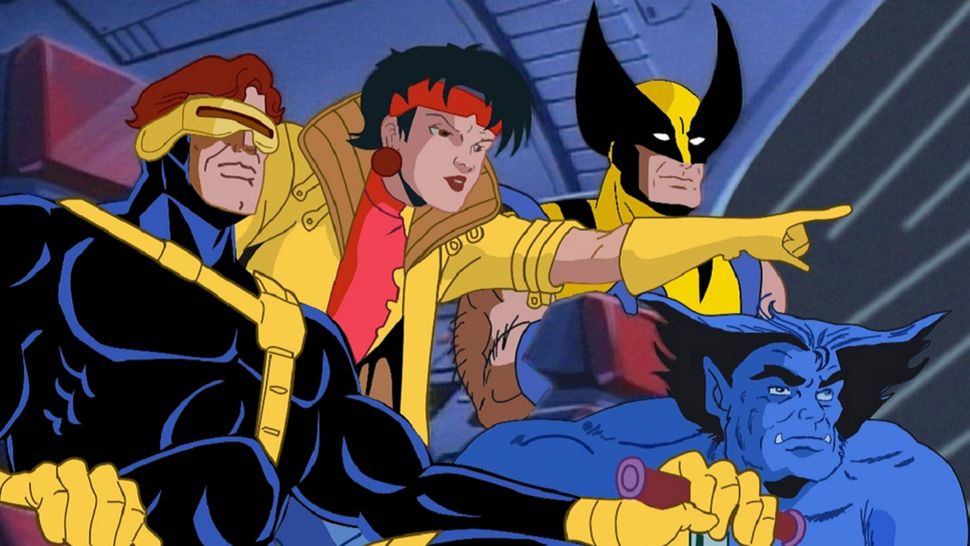
<h2 id="x-men-97">X-Men ‘97</h2>

<p><em>X-Men ‘97</em> won’t be for everyone, but it did transport me right back to a Saturday morning in the 90’s, with that intro score…</p>

<figure>
    <div class="post__image-wrapper">
        <img src="/assets/images/x-men-97.webp" alt="Wolverine, Cyclops, Jubilee and Best - characters in X-Men '97" />
    </div>
    <figcaption>Instant 90's nostalgia, with unexpected plot</figcaption>
 </figure>

<p>This new series picks up where the last show ended, with the same art style (albeit now in 4k) and same characters. What I don’t remember from the original show was some genuinely moving episodes, “Remember It” being particularly striking. Season two is planned for 2026.</p>]]></content><author><name>Tom J Napier</name><email>hi@tomjnapier.co.uk</email></author><category term="reviews" /><summary type="html"><![CDATA[I got a cinema membership this year, and between that and the various streaming subscriptions I’ve not yet cancelled, I’ve watched a bunch of movies and some interesting TV. Here are my top, no, scratch that, memorable picks:]]></summary><media:thumbnail xmlns:media="http://search.yahoo.com/mrss/" url="https://tomjnapier.co.uk/assets/images/default-share.png" /><media:content medium="image" url="https://tomjnapier.co.uk/assets/images/default-share.png" xmlns:media="http://search.yahoo.com/mrss/" /></entry><entry><title type="html">I passed my CPACC exam!</title><link href="https://tomjnapier.co.uk/updates/2024/09/23/cpacc" rel="alternate" type="text/html" title="I passed my CPACC exam!" /><published>2024-09-23T08:00:00+00:00</published><updated>2024-09-23T08:00:00+00:00</updated><id>https://tomjnapier.co.uk/updates/2024/09/23/cpacc</id><content type="html" xml:base="https://tomjnapier.co.uk/updates/2024/09/23/cpacc"><![CDATA[<h2 id="certified-fresh">Certified Fresh!</h2>

<p>After a few months of study and revision, I took, and passed, my CPACC exam. This means I’m now a <a href="https://www.accessibilityassociation.org/s/certified-professional">Certified Professional in Accessibility Core Compentencies</a>. I think the title is apt - the knowledge required for this exam covered lots of different aspects of accessibility, in reasonable detail.</p>

<p>This is an internationally recognised qualification from the <a href="https://www.accessibilityassociation.org/s/">International Association of Accessibility Professionals (IAAP)</a>. Whilst it wasn’t a really difficult exam for me, I’m still proud and more than a little relieved to have passed.</p>

<p>The qualification requires knowledge on models and types of disability, universal design, demographics and accessibility standards and laws.</p>

<h2 id="the-exam">The Exam</h2>

<p>The exam itself was quite formal, as described by the clear guidance on IAAP’s website. It was a closed book exam (no looking up the answers) - and I wasn’t allowed anything in the exam room, not even a water bottle. Fortunately, I whizzed through the exam quite quickly, which, for good or for ill, seems to be my style.</p>

<p>Out of the 100 multiple choice questions, there were about ten questions that I really wasn’t sure on. So after 30 minutes or so going through the questions, I’d got less than a dozen which I’d flagged to go back to that I needed to mull over some more. Those ten were head-scratchers for me - not because I’d not covered the subject matter, but more because I was reading each question in multiple ways. So I took my best guess.</p>

<p>Driving home from the test centre, I reflected that I’d got at least two questions wrong. I didn’t feel entirely confident that I’d not fluffed it, but a few weeks later, late on a Friday afternoon, I got that very good news!</p>

<h2 id="what-next">What next?</h2>

<p>This was the first exam I’ve done in a good while and I’m not itching to do loads more. However, the next logical target to aim for would be the <a href="https://www.accessibilityassociation.org/s/wascertification">Web Accessibility Specialist (WAS)</a> qualification. This, as the name suggests, would be a lot more web focussed, and much more technical. In many ways, that’s right up my street - so I probably have to start at least thinking about it in earnest now!</p>]]></content><author><name>Tom J Napier</name><email>hi@tomjnapier.co.uk</email></author><category term="updates" /><summary type="html"><![CDATA[Certified Fresh!]]></summary><media:thumbnail xmlns:media="http://search.yahoo.com/mrss/" url="https://tomjnapier.co.uk/assets/images/default-share.png" /><media:content medium="image" url="https://tomjnapier.co.uk/assets/images/default-share.png" xmlns:media="http://search.yahoo.com/mrss/" /></entry><entry><title type="html">2024 Reading List</title><link href="https://tomjnapier.co.uk/reviews/2024/09/02/2024-reading-list" rel="alternate" type="text/html" title="2024 Reading List" /><published>2024-09-02T08:00:00+00:00</published><updated>2024-09-02T08:00:00+00:00</updated><id>https://tomjnapier.co.uk/reviews/2024/09/02/2024-reading-list</id><content type="html" xml:base="https://tomjnapier.co.uk/reviews/2024/09/02/2024-reading-list"><![CDATA[<p>Some highlights of what I’ve read this year. I’m a painfully slow reader, but if I manage to get through anything else before January, I’ll update this.</p>

<h2 id="read-so-far">Read so far:</h2>

<ul>
  <li><a href="#chip-war">Chip War</a> - Chris Miller</li>
  <li><a href="#dracula">Dracula</a> - Bram Stoker</li>
  <li><a href="#homo-deus">Homo Deus</a> - Yuval Noah Harari</li>
  <li><a href="#children-of-time">Children of Time</a> - Adrian Tchaikovsky</li>
  <li><a href="#weaving-the-web">Weaving the Web</a> - Tim Berners-Lee</li>
  <li><a href="#the-bees">The Bees</a> - Laline Paull</li>
</ul>

<h2 id="chip-war">Chip War</h2>
<p><em>by Chris Miller</em></p>

<p>I heard an interview with Chris Miller on Ezra Klein’s podcast and had <em>Chip War</em> on my reading list since. I started this as an audiobook, which was a bit heavy going.</p>

<p>On paper, it rattles along through the post-war changes to the world economy and how these increasingly tiny chunks of silicon - the eponymous ‘chips’ - were shaping that economy.</p>

<p>Essential reading to understand Russia through the Cold War (and perhaps some of its doctrinal weaknesses in Ukraine today), and why China might eventually increase hostilities towards Taiwan.</p>

<p><em>Chip War</em> does a great job of framing the semiconductor supply chain - illustrating many of the perplexing bottlenecks and immense technical challenges in the manufacturing process that puts impossibly small microchips into the latest iPhone or the next Google Pixel.</p>

<h2 id="dracula">Dracula</h2>
<p><em>by Bram Stoker</em></p>

<p><em>Dracula</em> is probably something I should have read as a teenager. Each passing chapter felt like the birth of new horror tropes and gothic motifs. Reading it I finally understand countless cultural references and those slightly weird spin-off movies <em>Van Helsing</em> and <em>Renfield</em>. Thinking about it, the character of Renfield is as engrossing (emphasis on <em>gross</em>) now as it must have been in 1897, when Dracula was published.</p>

<p>Iconic, and makes me want to take a trip back to Whitby.</p>

<h2 id="homo-deus">Homo Deus</h2>
<p><em>by Yuval Noah Harari</em></p>

<p>I didn’t find Harari’s follow up to the incredibly popular <em>Sapiens</em> quite as easy a read, struggling to find the through-line as intuitively. There’s a perspective changing portion on evolution and free will that I found made the book though.</p>

<h2 id="children-of-time">Children of Time</h2>
<p><em>by Adrian Tchaikovsky</em></p>

<p>I turned the final pages of Adrian Tchaikovsky’s <em>Children of Time</em> on the last day of my week long solo holiday to the tiny Greek island of Ano Koufonisi - quite swift reading for me.</p>

<p>One of the best sci-fi novels I’ve read - and I’m not a newbie. Tchaikovsky’s purposeful arachnid world-building here is elevated through themes of evolution, intelligence and enlightment. Not for the spider phobic!</p>

<h2 id="weaving-the-web">Weaving the Web</h2>
<p><em>by Tim Berners-Lee</em></p>

<p>From one type of web to another - completely unintentionally. I acquired this from a charity shop and it’s been silently situated on my bookshelf for a decade. Perhaps because of a particular presentation I’ve been giving at work recently, I’ve finally started acquianting myself with this old account of the birth of the web.</p>

<p>It’s not the most poetic prose, reading, at times, more like 90’s diary entries. However, it’s a perfect time capsule of a different, exciting era, pubished the same year the first <em>Matrix</em> movie released. There’s a chapter which references this new thing being worked on, the <em>Document Object Model (DOM)</em>, which scrambled my head a bit - I can’t imagine a time without that.</p>

<p>Berners-Lee is generous in sharing the credit with his contemporaries, and his vision for what the web is and could be is genuinely inspiring. Important study in modern times of tech billionaires, social media misinformation and privacy regulation. Themes, coincidentally, that inventor of the web wrote on with piercing clarity a quarter of century ago.</p>

<h2 id="the-bees">The Bees</h2>
<p><em>by Laline Paull</em></p>

<p>Jen has been urging me for a while to start this, but for whatever reason I felt disinclined. A few chapters in though, and I had wished I’d began <em>The Bees</em> ages ago.</p>

<p>It’s an interesting companion piece, albeit a very different genre, to <em>Children of Time</em>. Paull’s characterisation of the hive and home of honey bee Flora 717 and her experience of a world steeped as much in dogma and authoritarianism as it is in wax and nectar is a sensorial treat. Easy reading, but that’s perhaps because the imagery is painted with seeming effortlessness.</p>

<p>I watched an interview recently with Laline Paull where she cited Richard Adams’ <em>Watership Down</em> as inspiration. That has been on my bookshelf for as long as <em>Weaving the Web</em>, but <em>The Bees</em> has put it somewhat higher on my reading list now.</p>]]></content><author><name>Tom J Napier</name><email>hi@tomjnapier.co.uk</email></author><category term="reviews" /><summary type="html"><![CDATA[Some highlights of what I’ve read this year. I’m a painfully slow reader, but if I manage to get through anything else before January, I’ll update this.]]></summary><media:thumbnail xmlns:media="http://search.yahoo.com/mrss/" url="https://tomjnapier.co.uk/assets/images/default-share.png" /><media:content medium="image" url="https://tomjnapier.co.uk/assets/images/default-share.png" xmlns:media="http://search.yahoo.com/mrss/" /></entry><entry><title type="html">Welcome!</title><link href="https://tomjnapier.co.uk/updates/2023/06/25/welcome" rel="alternate" type="text/html" title="Welcome!" /><published>2023-06-25T00:13:09+00:00</published><updated>2023-06-25T00:13:09+00:00</updated><id>https://tomjnapier.co.uk/updates/2023/06/25/welcome</id><content type="html" xml:base="https://tomjnapier.co.uk/updates/2023/06/25/welcome"><![CDATA[<p>I like writing. I often think that I don’t do it very much, but as with most jobs that aren’t manual or vocational now, I spend a large part of my day writing emails. I try hard to write clearly and craft my email communications so they’re clear for my colleagues; it is pretty draining though.</p>

<p>For a while now I’ve been wanting to write for enjoyment, not for work. I’ve never really had enough self-discipline to properly commit to writing something substantial. I’d love to write a novel someday, but I’m under no illusions as to how much time, effort, persistance and skill is required to do that.</p>

<p>So instead, I’ll settle for a blog!</p>

<p>I might write a bit more about work and technical stuff at some point, but at least for now, I want to keep these articles from being completely dull. So I’ll kick off with some reviews of stuff that I’ve enjoyed recently.</p>]]></content><author><name>Tom J Napier</name><email>hi@tomjnapier.co.uk</email></author><category term="updates" /><summary type="html"><![CDATA[I like writing. I often think that I don’t do it very much, but as with most jobs that aren’t manual or vocational now, I spend a large part of my day writing emails. I try hard to write clearly and craft my email communications so they’re clear for my colleagues; it is pretty draining though.]]></summary><media:thumbnail xmlns:media="http://search.yahoo.com/mrss/" url="https://tomjnapier.co.uk/assets/images/default-share.png" /><media:content medium="image" url="https://tomjnapier.co.uk/assets/images/default-share.png" xmlns:media="http://search.yahoo.com/mrss/" /></entry></feed>